
Leo is Stopping Development
This morning I read a message from EKR on the mailing list:
Leo 6.6 may be the last substantial release in Leo’s history. At present, the 6.6 to-do list contains five items. There are no items at present on the 6.7 to-do list. Many open items remain, but I have little desire to do any of them. Expect 6.6 final in a month or so.
The leojs project now seems like the future of Leo. Indeed, it melds Leo with vs code, an unbeatable combination imo.
As a long-time user of Leo Editor, I’d like to pay tribute here. EKR also promoted leojs in the email, which reminds me of:
Anything that can be Written in JavaScript, will Eventually be Written in JavaScript
Leo Memories
I used Leo for knowledge management for a period of time. I recorded project information of all sizes, wrote documents, meeting notes, and took notes.
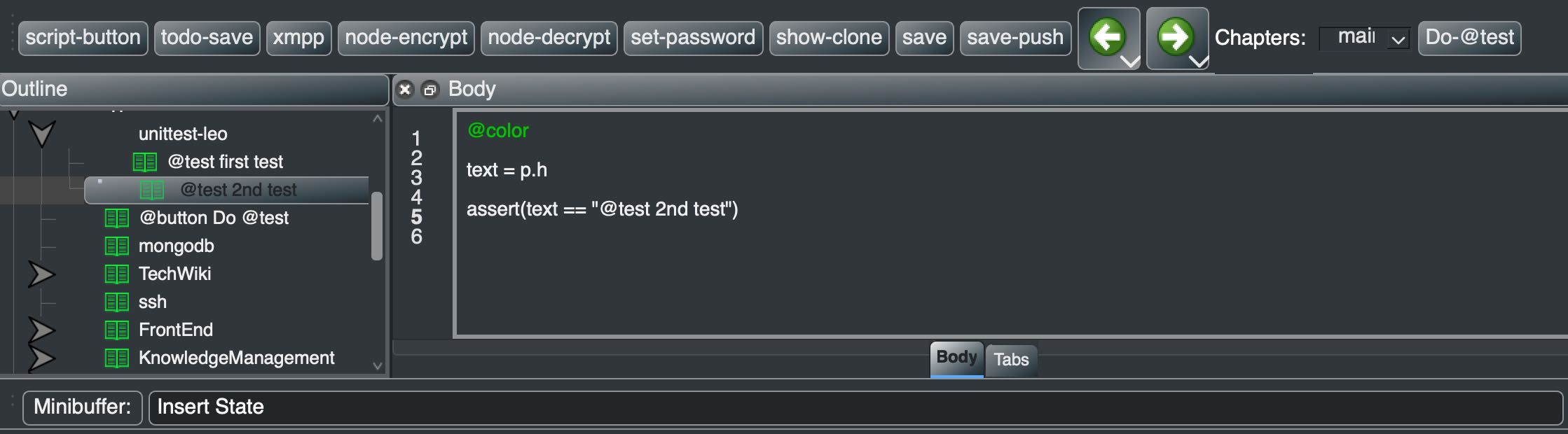
I also made some extensions for it:
- Added keyboard shortcuts for Git Add, Commit, and GitHub Push - one button to automatically commit to local git and push to a private GitHub repository for backup. The save-push button in the image above does this.
- Read xmpp messages sent from phone and generated image files and text info under specific Leo nodes.
- Added encryption/decryption for certain node information.
- Added bi-directional sync with simpletask todo.txt files. Could manage a todo list on both phone and computer simultaneously.
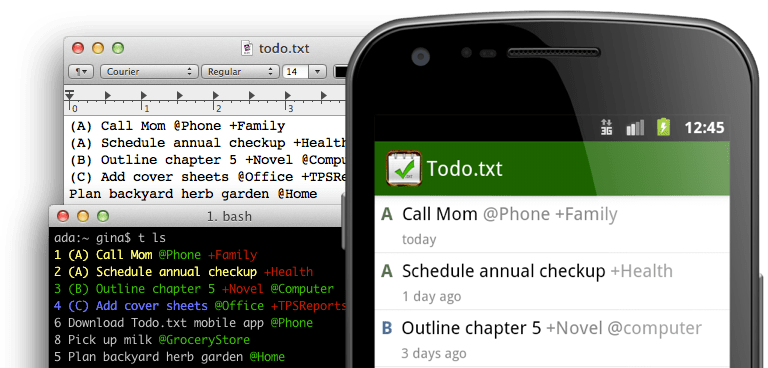
Later, after switching to Foam in VS Code, I used Leo less and less. Leo itself is an Outliner that displays knowledge in a tree structure. Each node has a topic and content. Nodes have different types with different display methods.
In the community, some people use it for code development - Leo itself is a large Python project developed within Leo. Many non-software professionals also use it for writing documents and notes.
Clone Operation, Leo’s Soul
Leo has one characteristic that’s impressive. It can create Views of knowledge. For example, if you save many small knowledge fragments, each paragraph is a Node. When you have a new project, you can create a node and clone other system nodes into this project.
“Clone” is the term used in the Leo community, but “reference” would be more accurate. The information isn’t copied - it’s referenced in the view.
If each subtree is treated as a project view, the same paragraph can appear in different views. Change one place, and others change too. Deleting one view doesn’t affect others. Only when the paragraph itself and all its clones are deleted does the information truly get removed from the system.
This allows creating multiple views of knowledge for different scenarios and projects.
For work that needs focused attention for a period of time, you can easily create a view, clone the nodes you need into it. After the work is done, just delete the view node. The work results are already reflected in other system nodes.
Leo internally uses a Directed Acyclic Graph (DAG) data structure to store nodes, supporting the clone operation.
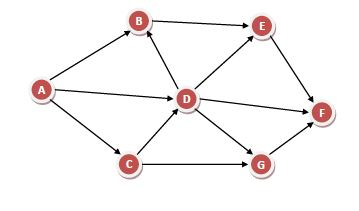
In the image above, you can see Node D under both Node A and C. The reason for using an acyclic graph is that Leo has many commands that traverse all child nodes. For example, generating a PDF from a node - all child nodes become chapters. An acyclic graph supports this scenario well.
Future
Leo is powerful with great extensibility and a friendly development community. The problem is that as an editor, its ecosystem isn’t good enough - the community is too small.
Believing in embracing VS Code is the right choice. Using leojs to bring Leo’s essence into VS Code as an extension, combining with other extensions, will bring richer features to users.