
1. Project Overview
The expected outcome of this small project is to allow Directus to support logging in with DingTalk accounts. After understanding the OAuth2 protocol (see the previous blog post, reference 1), we have enough knowledge to implement this. Directus natively supports GitHub login, so the approach is to start with GitHub. Follow these steps:
- Configure Directus to use GitHub account login to get familiar with Directus’s standard OAuth support
- Configure Directus to use DingTalk account login; since DingTalk’s protocol implementation differs from RFC6749/GitHub, we may need to handle issues as they arise
- Deploy Directus to the server environment and verify on both DingTalk PC and mobile versions
2. Environment Configuration
Use ngrok locally to expose a service to receive OAuth server redirects.
ngrok http 8055
Get https://445a-240e-47c-30b0-3b10-600e-ea25-cde5-2334.ngrok.io/ as the public domain to access the local port 8055 where directus is running.
3. Directus GitHub Login
Configure parameters according to reference material 2. In the following configuration, for each new GitHub authorized user, Directus will automatically create a Directus user using the user’s email during the login process and assign it the role AUTH_GITHUB_DEFAULT_ROLE_ID.
After restarting Directus to apply the configuration, you can see the GitHub option on the login page.
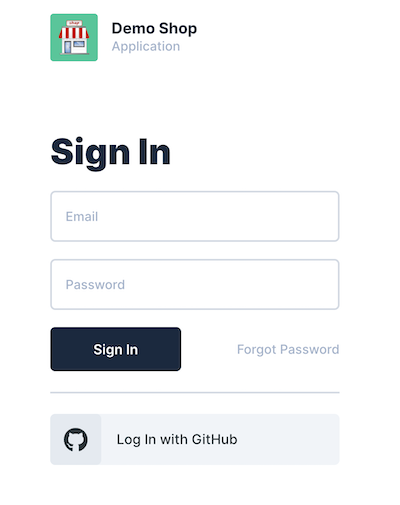
After selecting and authorizing, you can successfully log in to Directus. Check that the newly generated user and permissions in Directus are normal.
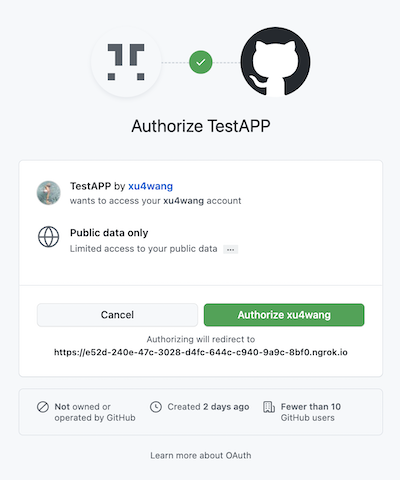
4. Attempting Directus DingTalk Login
First, try to configure it similar to GitHub.
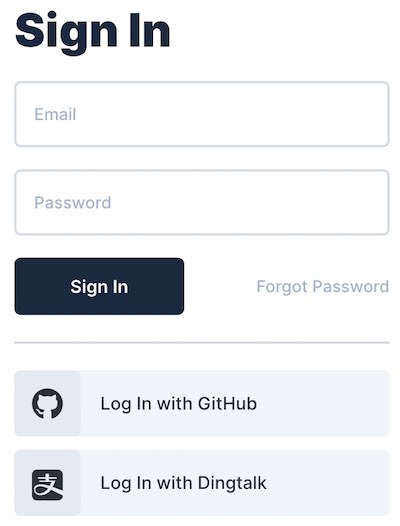
Clicking Log In with DingTalk authorizes normally, but after authorization it redirects to:
Suspect that the URL redirected back from DingTalk doesn’t have a code parameter (refer to the previous article about protocol analysis - DingTalk uses authCode parameter). First, I opened an issue in the community to see if anyone else has encountered this.
At the same time, I made a temporary patch to the oauth2 driver. When there’s an authCode, assign it to code.
    try {
        res.clearCookie(`oauth2.${providerName}`);

        if ( req.query.authCode) {
            req.query.code = req.query.authCode
        }

        if (!req.query.code || !req.query.state) {
            logger.warn(`[OAuth2] Couldn't extract OAuth2 code or state from query: ${JSON.stringify(req.query)}`);
        }

        authResponse = await authenticationService.login(providerName, {
            code: req.query.code,
            codeVerifier: verifier,
            state: req.query.state,
        });
    } catch (error: any) {
        ...
After restarting directus again, the patch seemed to work. This time it redirected to:
The first step of the OAuth2 protocol (getting the code) has passed. Is SERVICE_UNAVAILABLE a problem with getting the token or getting the profile?
I noticed that in the request to get the token from DingTalk, the parameter names are clientId, clientSecret. While GitHub uses client_id, client_secret. Additionally, DingTalk requires an extra grantType.
Configure clientId, clientSecret, and grantType as parameters in the directus request.
Still getting SERVICE_UNAVAILABLE. After checking the driver, the problem is in the following:
    try {
        tokenSet = await this.client.oauthCallback(
            this.redirectUrl,
            { code: payload.code, state: payload.state },
            { code_verifier: payload.codeVerifier, state: generators.codeChallenge(payload.codeVerifier) }
        );
        userInfo = await this.client.userinfo(tokenSet.access_token!);
    } catch (e) {
        throw handleError(e);
    }
The above code throws an exception because the HTTP response is 400. It should be that the DingTalk OAuth server doesn’t recognize the message sent by Directus.
The context of the above code execution:
- In the oauth2 driver, the express route is configured to handle the code redirected from DingTalk. During processing, the user needs to be authenticated (successful authentication completes login and issues JWT token);
- User authentication is independent of the driver, handled by a general AuthenticationService.login service, which calls the driver’s getUserID method to get userId;
- For the oauth2 driver, no username/password is passed from the web page. Its only input is the code redirected from DingTalk. It needs to convert the code to a token through the OAuth interface, then read the user information to know the userID.
The OAuth2 Driver uses openid-client to communicate with the server. The client is also initialized in the driver:
    const issuer = new Issuer({
        authorization_endpoint: authorizeUrl,
        token_endpoint: accessUrl,
        userinfo_endpoint: profileUrl,
        issuer: additionalConfig.provider,
    });

    this.client = new issuer.Client({
        client_id: clientId,
        client_secret: clientSecret,
        redirect_uris: [this.redirectUrl],
        response_types: ['code'],
    });
So the problem becomes compatibility between openid-client and DingTalk. More specifically, how to use the oauthCallback function to get tokens from DingTalk.
Looking at the implementation of openid-client, when interacting with OAuth servers, the POST form data uses parameter names hardcoded according to RFC6749. These inevitably don’t match DingTalk’s requirements. Using openid-client cannot be compatible with DingTalk. I discussed the research results in detail with the Directus OAuth Driver author in Integrating Dingtalk as OAuth2 server.
5. Conclusion
The original plan cannot be achieved. The reason is that DingTalk’s OAuth implementation is not compatible with the standard. Directus uses a third-party OAuth library to communicate with OAuth servers. The standard openid-client cannot communicate with DingTalk’s OAuth server that speaks a different “dialect”.
Two solutions are considered:
- Inherit from Directus’s standard oauth2 driver and implement a DingTalk dialect version of the oauth2-dingtalk driver, or
- Implement a proxy to translate DingTalk’s OAuth dialect to the standard OAuth2 protocol
I prefer solution 2, which is equivalent to creating a protocol wrapper for DingTalk, converting parameter formats according to the standard. This way, other systems that need to integrate DingTalk login in the future can also use it.
I will add more notes after completion.
6. Additional Notes
Refer to apiproxy which implemented password-free DingTalk login using solution 2 above.