
1. Collection
A Collection corresponds to a table in the database. Directus collections have some unique concepts, such as alias fields and sort attributes.
1.1. Alias
Fields that do not map directly to an actual database column are called “alias” fields. For example, presentation fields (such as dividers and groups) and certain relational types that display data stored elsewhere (such as One-to-Many (O2M) and Many-to-Many (M2M)).
O2M, M2M, M2A, etc., don’t have actual columns in the table. They are called alias fields.
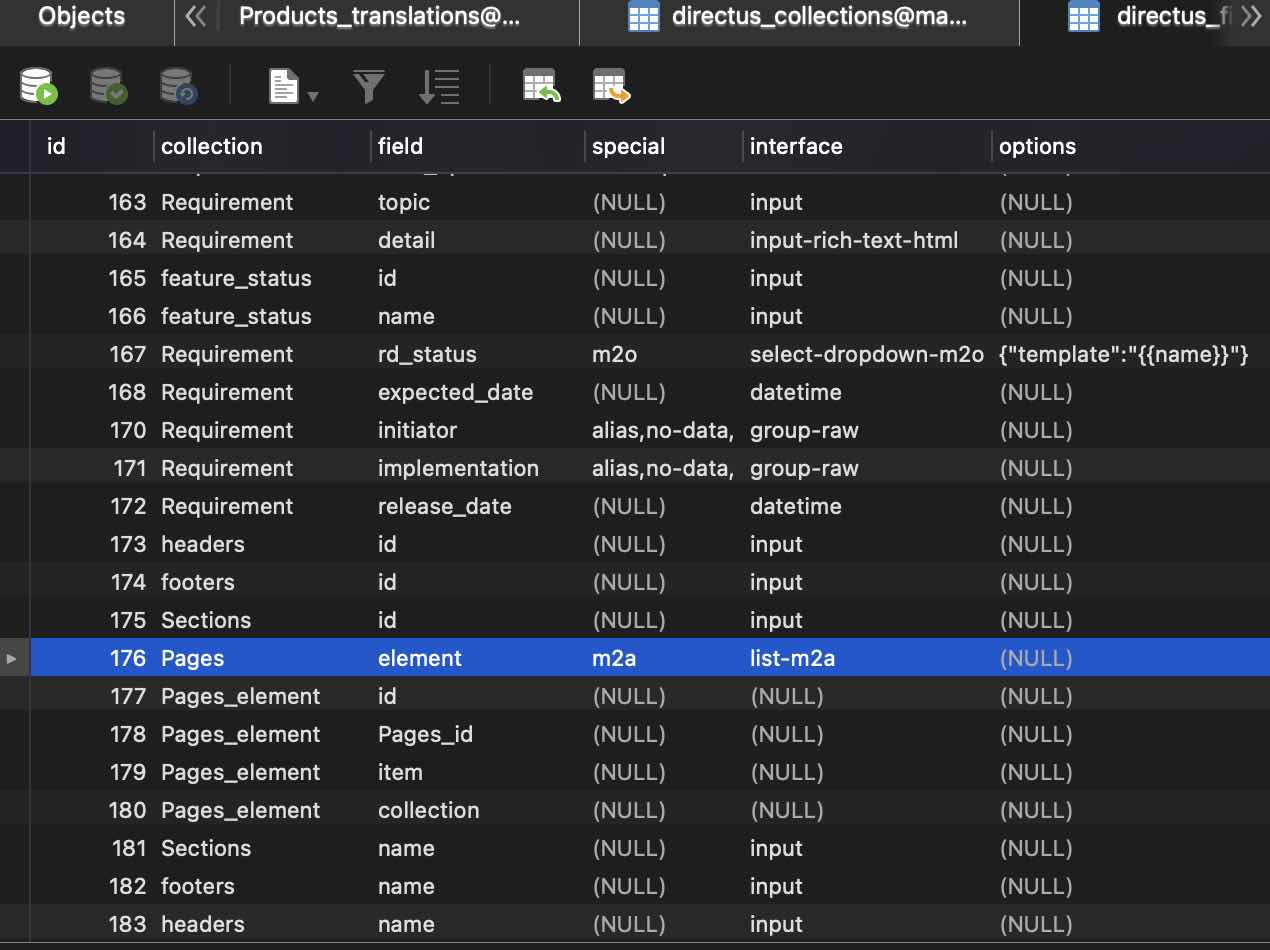
Although alias doesn’t have actual database table columns, they are recorded in the direct_fields table. For example, the element field of the pages collection above is an M2A type alias.
The direct_collections table describes all tables managed by Directus in the system, and direct_fields describes all fields of all tables. Through this non-intrusive method, the original table structure in the database can remain unchanged.
1.2. Sort Attribute
If, when creating a collection, you choose to enable sort support, a sort column will be added to the table. This column supports manually dragging to adjust the order of records in the app. The principle is simple - a number-type sort column is added to the table. When dragging, the values in this column change based on the record’s position.
1.3. Share
An app feature that can generate a link from a record in a model and send it to others for read-only access. You can set a password, expiration date, and which identity to read as.
In the database, Directus has a specific table, directus_shares, to manage all shares.

2. Relationship
Relationships between tables. Directus supports the following four types.
2.1. M2M
Implements many-to-many relationships through a junction table. For example, between Product and Tag.
2.2. O2M
One-to-many relationship, for example between order and order row. In the order row model, there needs to be a foreign key to determine which order the order row belongs to. You can add a foreign key order in the order row, whose value is the id from the orders table.
2.3. M2O
Same as O2M, just viewed from the order row’s perspective looking at the order.
2.4. M2A
Similar to M2M, the difference is that it can represent a collection’s relationship to multiple collections. In the junction table, besides storing ids, it also stores the collection name. For example, a Page may include header, footer, and section elements. The junction table below shows that page with id 1 includes footer with id 1, header with id 1, and section with id 2.
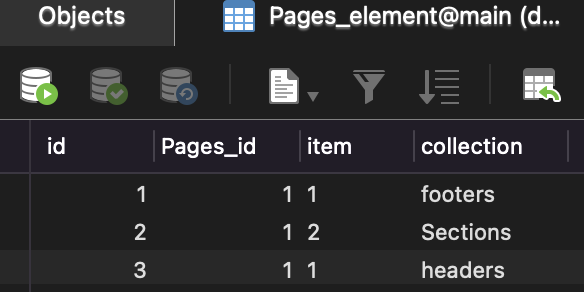
Using M2A relationships, you can conveniently add different items to a page in the app. This relationship is also called a replicator.
If you remove the collection column from the image above, M2A degrades to an M2M relationship, which can only represent relationships between two specific collections.
M2A stands for Many to Any. It’s called “Any” because the relationship table stores both collection name and id, so theoretically it can represent any element from any collection.
3. Internationalization (I18N) Solutions
3.1. Multi-language for Model Names and Field Names
Model names can be multi-language. Add “Collection Name Translations” in the model configuration.
Field names can be multi-language. Configure Field Name Translations in Model/Field.
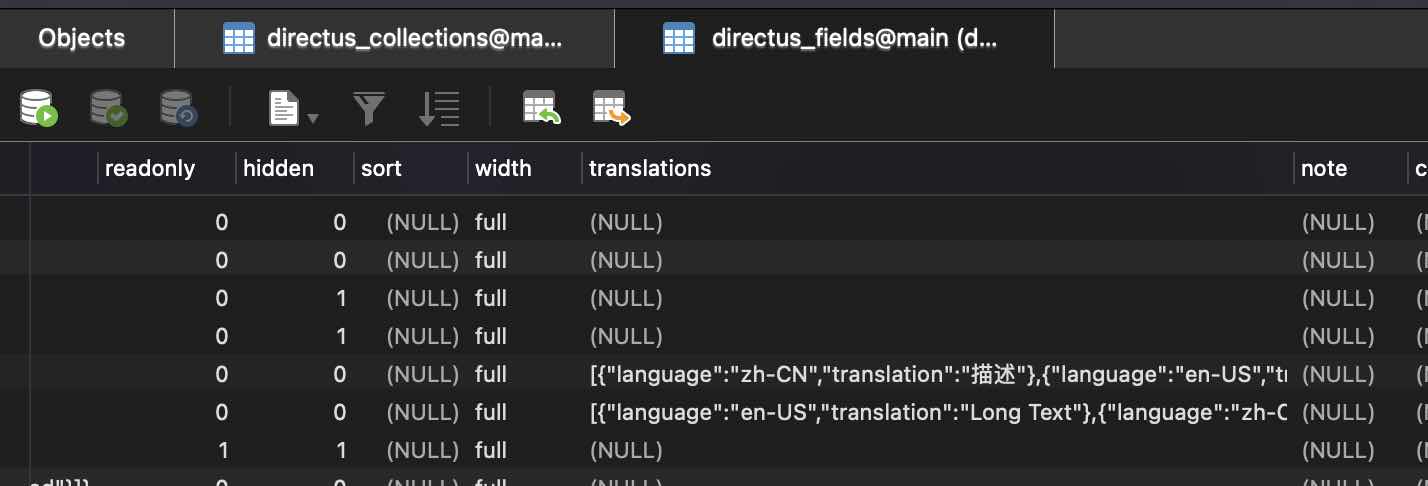
Multi-language data for model names and field names are stored in the database as JSON strings. Translations for all languages are stored together.
3.2. Multi-language for Record Content
Content elements within a model can be multi-language through a translations collection. The principle is to put all fields requiring multilingual support into a translations table. This table contains all columns requiring translations and a language code column (with values like zh-CN, en-US, etc.). This way, for each row in the original model, there will be corresponding rows in the translations model - one for Chinese, one for English, etc. - to store translated data. https://docs.directus.io/configuration/data-model/#creating-translated-multilingual-fields
Edit the data in the Languages model and keep only Chinese and English; then in the app, only Chinese and English translations will be displayed.
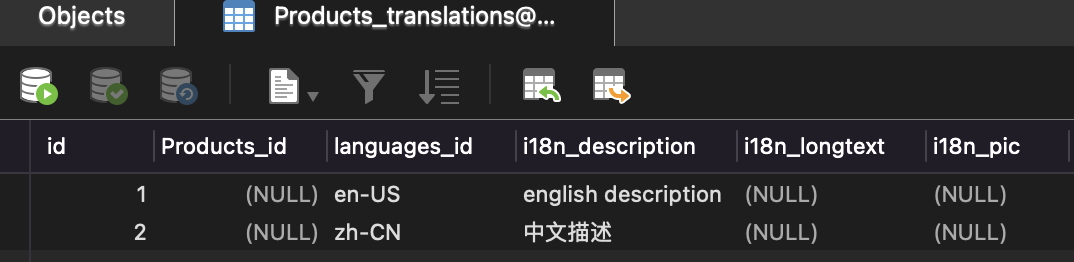
As shown in the image, the product collection has three fields requiring multi-language support: description, longtext, and pic. From the image, images also support multi-language (different images for different languages).
The most intuitive approach to implement multi-language is adding columns in the table - one for Chinese, one for English, one for Spanish, etc. However, this requires changing the table structure when adding new languages, which has poor scalability. Directus’s implementation has better scalability - one structure supports all languages.