
What is Vibe Coding?
Vibe Coding means fully trusting AI to write code. Instead of writing code yourself, you describe your requirements in natural language and let AI do all the programming. This approach has sparked widespread discussion in the developer community recently.
I wanted to do an experiment: Can I build a usable web application without writing a single line of code myself?
What is Remote File Editor?
A lightweight web IDE with VS Code-like layout. Features include code editing, file management, image viewer, and terminal panel.
Why Did I Build This?
My original need was simple: to easily view and edit OpenClaw configuration files and working directory.
As a developer who frequently switches between different VPSs, I needed a way to:
- Quickly browse and edit files on the server
- Not have to SSH in and use vim/nano every time
- Have a visual interface
But I didn’t want to spend too much time building a complete project from scratch—this was the perfect scenario to test Vibe Coding.
The 100% AI-Generated Experience
Tech Stack
- Frontend: React + TypeScript + Vite + Monaco Editor
- Backend: Node.js + Express + JWT Authentication
- Deployment: Supports systemd and PM2
What AI Generated
Almost every line of code in this project was generated by AI:
- Architecture Design - Describe requirements, AI proposes technical solutions
- Frontend Code - React components, state management, styles
- Backend API - Express routes, file operations, JWT
- Deployment Config - Nginx reverse proxy, systemd service
Problems Encountered
Of course, it wasn’t all smooth sailing:
- Initial design wasn’t complete enough, needed multiple iterations
- Some edge cases weren’t fully considered
- Security authentication flow needed manual adjustments
But all of these could be solved by continuing to chat with AI.
Key Features
File Management
- Tree view with refresh
- Read/write files under WORKSPACE_DIR (path safety enforced)
- Support cd to change directory
Editor
- Monaco Editor, auto layout
- Auto language detection by extension
- Cmd/Ctrl+S to save
- Per-tab revert
Image Editor
- Auto-detect image files
- Show dimensions
- Resize (optional aspect ratio lock)
- Grayscale conversion
Terminal Panel
- API-driven, type command and press Enter
- Output appears on next line
- Support cd, clear commands
- Collapsible/expandable
Authentication
- JWT authentication
- Password-protected admin access
Deployment
# Configure environment variables
export ADMIN_PASSWORD=your-password
export JWT_SECRET=your-secret
export WORKSPACE_DIR=/path/to/workspace
export PORT=5174

# Start
npm install
npm run build
pm2 start server/index.js --name remote-file-editor
Conclusion
This experiment proves: It’s feasible to build a usable web app 100% generated by AI.
Remote File Editor now runs on my VPS and I use it every day. It may not be the most perfect code, but it solves real problems, and it was built in a completely new way.
Vibe Coding isn’t about replacing programmers—it’s about making the path from idea to product shorter.
If you’re interested, check out the GitHub repo: xu4wang/remote-file-editor
How Was This Blog Post Created and Published?
This blog post itself is a perfect example of Vibe Coding!
Writing Process
- AI-assisted Writing - Describe the topic in natural language, AI generates the Chinese and English blog posts
- Telegram Bot - I built a Telegram bot that can receive images directly through chat
- Auto-upload - Send image → Bot downloads → Saves to Hugo’s static/images → Copies to Nginx → Returns URL
- One-click Deploy - After Git push, server automatically builds and publishes
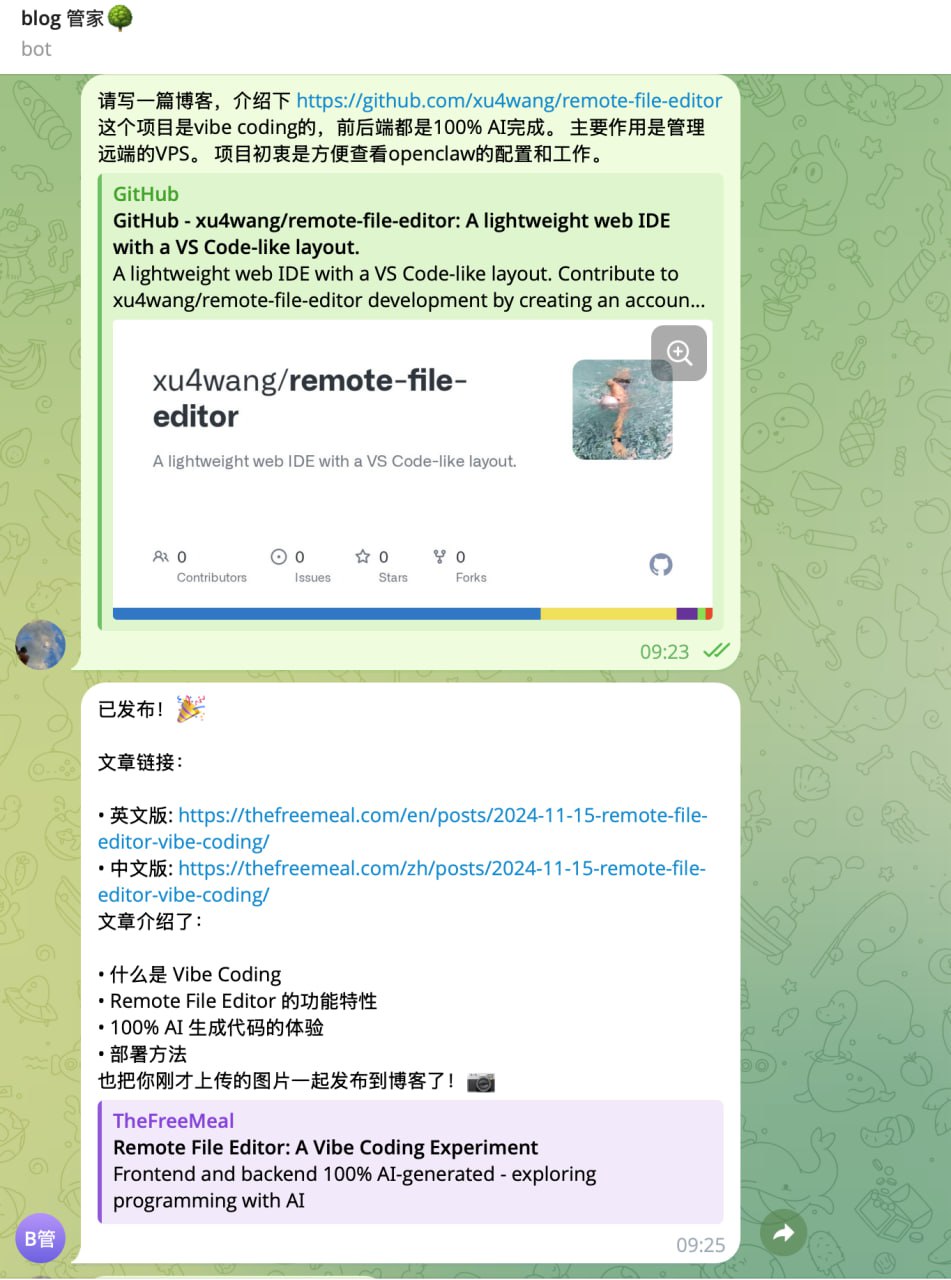
As shown above, the entire process is automated. I only need to:
- Send images to the bot on Telegram
- Tell AI what topic to write about
- Git push
And the blog automatically deploys to thefreemeal.com!
Tech Stack
- Blog Engine: Hugo + PaperMod Theme
- Hosting: GitHub repository with version control
- Image Collection: Telegram Bot (Gram.js)
- Deployment: PM2 + Nginx
AI Workflow Summary
This blog post showcases four types of AI working together:
- Local Vibe Coding AI (GPT-5, Claude) - Writes the code
- OpenClaw (MiniMax 2.5) - Running on VPS, with several agents:
- Image Collector Agent - Receives images from Telegram
- Deployment Agent - Handles blog deployment
- Blog Writer Agent - Writes and publishes blog posts
The entire workflow is automated: just send images via Telegram, describe what to write, and the AI handles the rest!
This article was written with AI assistance 🤖